How to Post Your Daily Exchange Rate Automatically
Customers ask for it, followers check it, and someone in the office types it into a post every morning. Here is how to post the day’s exchange rate automatically, from official data, without anyone remembering to do it.
7 min read · For exchange offices, travel agencies, importers and local pages


Who needs to post the exchange rate every day?
More businesses than you’d think. Anyone whose customers think in two currencies:
- Exchange offices and money transfer agents, whose customers check the rate before they come in.
- Travel agencies and hotels that sell in euros or dollars to customers who pay in their own currency.
- Importers, car dealers and real estate agencies that quote prices in a foreign currency.
- Accountants and consultants whose clients invoice abroad.
- Local news and community pages, where the day’s rate is one of the most read posts.
For all of them it is a small, useful post that brings people back every day. And for all of them it is the same chore: look up the rate, type it into an image, post it, every working day.
Which exchange rate should you post?
There isn’t one exchange rate, and the post should say which one it shows.
- The ECB reference rate is the official rate the European Central Bank publishes once a day for about 30 currencies against the euro. It is stable for the whole day and widely used as a reference in contracts and invoices.
- The live interbank rate is the rate banks trade at between themselves, as it moves during the day. It suits a morning post that shows where the market is, with today’s change.
- Your central bank’s rate. Many countries have their own official rate, used for taxes and accounting. If that is what your customers ask for, use it.
- Your own buy and sell rates are what you charge. They are not any of the above, and the post should not suggest they are.
How do you set up an automatic exchange rate post?
- Pick the rate. In Recurset the ECB Reference Rate robot posts the ECB’s rate for your pair every working day at 16:30 Berlin time, after it is published. The Live Exchange Rate robot posts the live rate and today’s change every working day at 09:00 Bucharest time.
- Choose your pair. Enter the base and the quote currency, for example EUR and RON, or USD and GBP. Add your handle or website and it goes on every image.
- Make the design yours. Your colours, your logo, your fonts, in the template editor. The rate, the date and the change are filled in every day.
- Choose your pages. Instagram and Facebook on any plan; Telegram and LinkedIn on Starter. Change the hour if your customers look at another time.
- Choose how it goes out. Approve the first posts, then let them go out on their own. A rate post is made only from data, so there is little that can go wrong in the wording.
The caption is fixed text with the rate filled in. There is no AI involved, so the post uses none of your AI allowance and reads the same way every day, which is what you want from a number people rely on.
Post the official rateECB Reference Rate runs on the Free plan, every working day.
See the robotWhere does the data come from?
- The ECB publishes its euro reference rates every working day, usually around 16:00 CET, and makes them public. Recurset reads them through Frankfurter, an open-source service that serves the ECB’s data. The image says “Data: ECB via Frankfurter”.
- The live rate comes from Yahoo Finance’s market data, read at the moment the post is made. The image says where it comes from and the date.
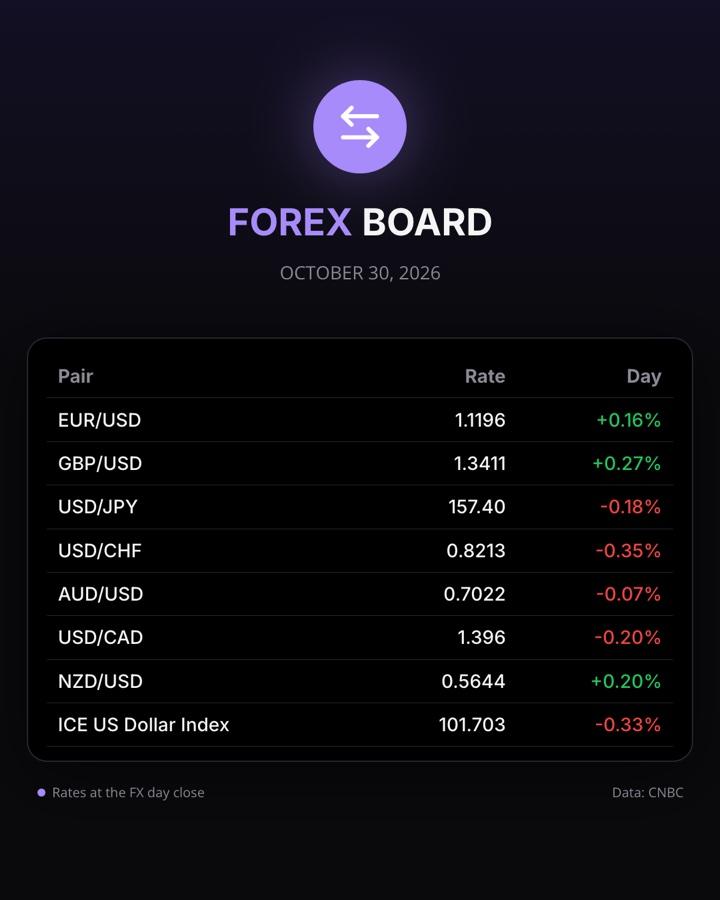
- The major pairs at the close, for a page that follows the currency market, come from CNBC’s market data in the Forex Board robot.
Neither the ECB rate nor the live rate needs an account or an API key, which is why they work on the Free plan.
What if I need another rate?
If your customers ask for your central bank’s rate, a commercial bank’s rates or your own buy and sell prices, describe it to Copilot: which rate, from where, which pairs and at what time. If the rates are published on a page or in a feed, it sets up an agent that reads them and posts them in your design. If you aren’t sure where your rates can be read from, write to us.
What are the other ways to do it?
- By hand, with a design template. A template in Canva and a few minutes a day. It works until the day nobody does it, and a typo in a rate is easy to miss.
- A workflow in Zapier or n8n. A schedule, a currency API, an image service to make the picture and a step for each network. Flexible, but four services to set up and keep running for one post.
- A rate widget on your website. Useful for visitors who come to your site, but it doesn’t reach the people who follow you on social media.
If you want the rate posted every working day in your design, without building anything, that is what a Recurset agent does.
What mistakes should you avoid?
- Not saying which rate it is. “ECB reference rate” or “interbank rate” on the image avoids customers expecting it at your counter.
- Presenting a reference rate as your price. If you buy and sell currency, make clear that the post shows the market or official rate, not yours.
- Posting on days the rate doesn’t change. The ECB doesn’t publish on weekends, so a weekend post repeats Friday’s rate. The robots post Monday to Friday.
- No date. A rate without a date is a guess. Put the date on every image.
- Too many decimals, or too few. Four decimals is the usual precision for most pairs; two are enough for pairs like USD/JPY.
Questions
Which currencies can I post?+
Any pair the data covers. The ECB publishes reference rates for about 30 currencies against the euro, and any two of them can be combined, like USD to GBP. The live rate covers most traded currencies.
What time is the ECB rate published?+
Usually around 16:00 Central European Time on working days. The ECB Reference Rate robot posts at 16:30 Berlin time, Monday to Friday, so the day’s rate is always in.
Can it show my own buy and sell rates?+
Not from the ECB or market data: those are reference rates, not your prices. If your rates are published on your website or in a spreadsheet, Copilot can set up an agent that reads them from there.
Can it post to LinkedIn?+
Yes, on Starter and Pro, which add LinkedIn and Telegram. Free covers Instagram and Facebook.
Does it use AI?+
No. A rate post is made straight from the data, with a fixed caption, so it uses none of your AI allowance and the wording is the same every day.